Multi-chat
Let agents handle multiple live website chats at the same time, each in its own private Microsoft Teams conversation.
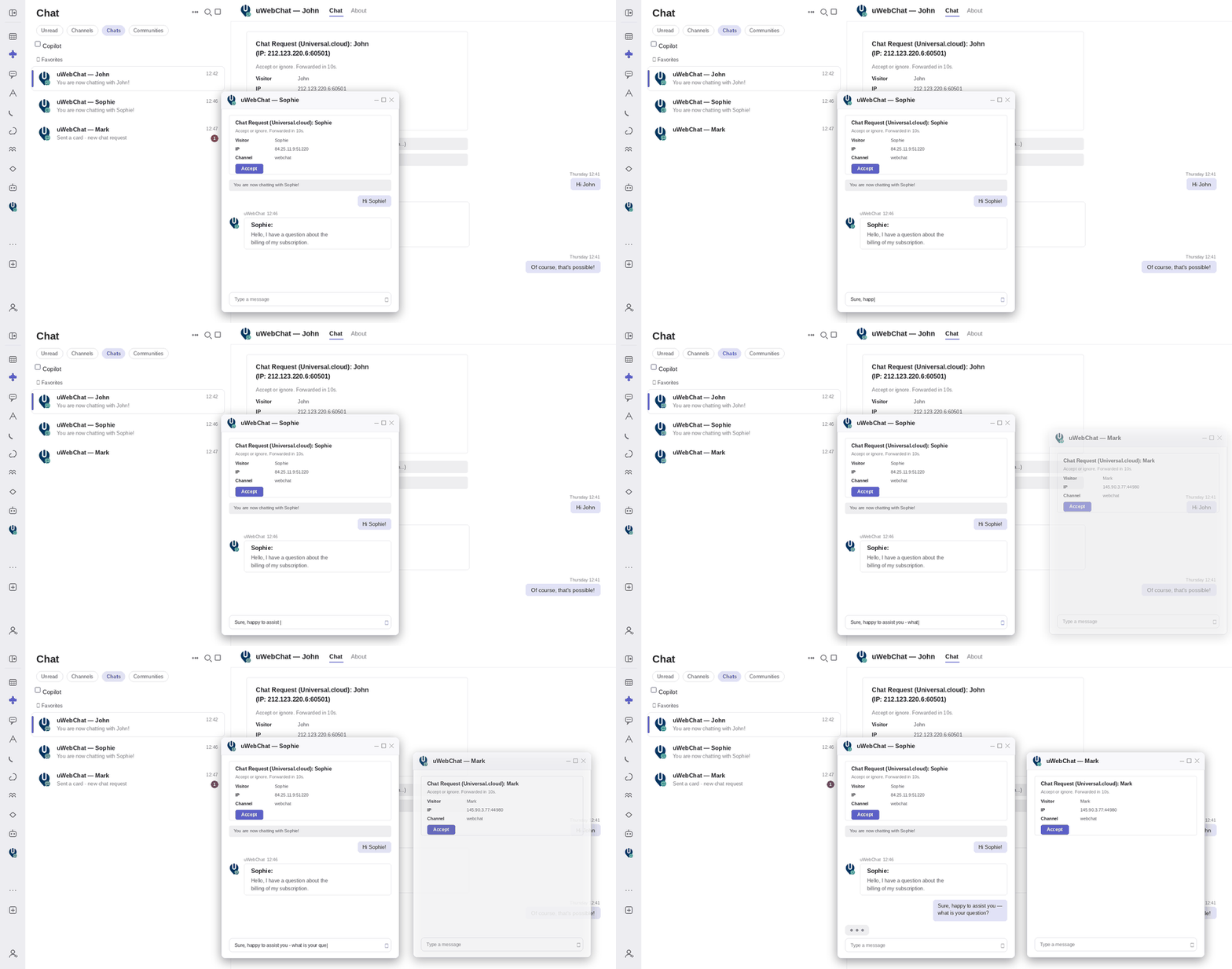
During busy hours, visitors wait. With a traditional one-chat-at-a-time setup, a single agent can only help one person while everyone else sits in the queue, even during the natural pauses between replies. Multi-chat removes that bottleneck: your agents take on several concurrent conversations, so quiet moments in one chat are used to help the next visitor. And it does this without compromising privacy: every conversation opens as its own separate Microsoft Teams group chat.
More conversations per agent
Agents handle several live chats at once, so the natural pauses in one conversation are used to help the next visitor. You get more out of every agent during peak hours, without hiring more staff. An agent counts as available as long as they still have a free chat slot.
A private Teams chat for every visitor
Each visitor conversation opens as its own separate Microsoft Teams group chat, containing only the assigned agent and the uWebChat assistant. Chats never get mixed up, messages never end up in the wrong window, and colleagues never see conversations that aren't theirs.
You decide the capacity
Multi-chat is fully configurable per agent. Set a senior agent to handle several conversations at once while a new team member starts with one. The default is a single chat, the classic experience, and capacity can be raised up to five simultaneous chats per agent.
Works right inside Microsoft Teams
There is nothing new to learn or install. Agents reply from Microsoft Teams, where they already work, and messages relay back and forth to the visitor in real time. When a chat ends, the agent closes it or simply leaves the conversation, and the slot frees up for the next visitor.
Safe by default
Agents who shouldn't multitask simply keep the classic one-chat experience. Nothing changes for them. And if your Microsoft 365 administrator hasn't granted approval yet, uWebChat automatically falls back to one-chat-at-a-time. Nothing breaks; visitors are still helped as usual.
Key benefits
- Shorter wait times for visitors
- More conversations per agent during peak hours
- A private, separate Teams chat for every visitor
- Capacity set per agent, up to five at once
- Works inside Microsoft Teams, nothing new to learn
Frequently asked questions
Will agents see each other's chats?
No. Every conversation is a private Microsoft Teams chat between one agent and the uWebChat assistant only. Colleagues never see chats that aren't theirs.
What happens if an agent reaches their limit?
New visitors are routed to other available agents. If everyone is at capacity, visitors are handled by your normal "no agents available" flow, for example, a leave-a-message option.
Do agents need to install anything new?
No. Multi-chat works inside Microsoft Teams, where your agents already work.
Can I turn it off for some agents?
Yes. Capacity is set per agent. Anyone left at one chat keeps the classic single-conversation experience.
Is there a maximum number of simultaneous chats?
Yes, up to five per agent, so quality of service stays high.
Explore related features
Discover more features that work well with Multi-chat
Ready to get started with Multi-chat?
Try uWebChat free and see how Multi-chat can improve your customer communication.
Start freeReady to transform your customer communication?
Start your free trial today and see the difference