Privacy by design: why security and compliance come first at uWebChat
Every chat contains personal data. That's why we built uWebChat with security as the starting point, not an add-on.
 uWebChat Team··3 min read
0
conversation databases
30 min
max. cookie lifetime, only during a chat
ISO 27001
certified team
How it works
Your conversations stay in your own environment
Website visitor
uWebChat widget
Your Microsoft 365 tenant
No uWebChat database in between
Privacy by design
Four choices we made on purpose
No conversation database
What isn't stored can't leak. Chats live only in Teams.
AI in your own tenant
The virtual assistant runs where your conversations are.
A widget that doesn't track
Nothing is stored until a chat starts. No analytics.
Protection against abuse
Ban visitors with one click or block entire countries.
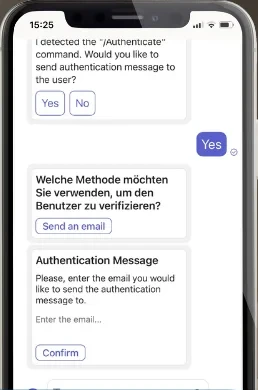
Visitor verification
Know who you're talking to
Visitors confirm a code by email or SMS before the chat starts. Agents see right away that the visitor is verified.
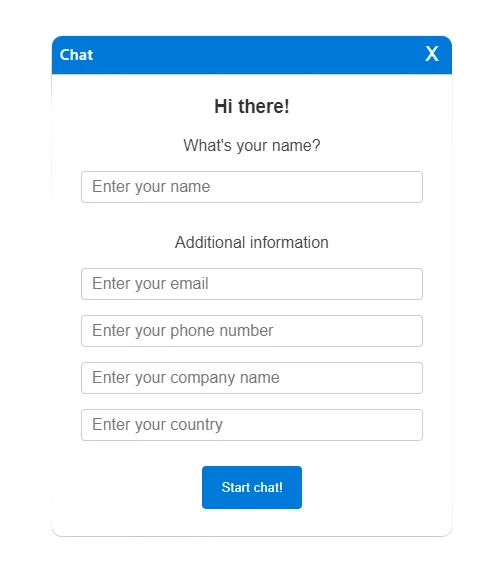
Data minimisation
Only ask what you need
You decide which visitor fields appear and which are required. Often a first name is enough.
Many chat tools vs uWebChat
Many chat tools
- Conversations stored in the vendor's database
- AI processed on the vendor's platform
- Tracking from the moment the page loads
- Another system with its own retention rules
uWebChat
- No conversation database: chats live in Teams
- Virtual assistant runs in your own tenant
- Nothing stored until a visitor starts a chat
- Your Microsoft 365 retention policies apply
What you still arrange yourself
A secure platform does a lot. These five things remain up to you:
- Mention your privacy statement in the welcome message
- Say when a virtual assistant is answering (EU AI Act)
- Set a retention period for your Teams chats
- Never ask for card numbers or passwords in the chat
- Be ready for access and deletion requests
“Security isn't a checkbox at the end. It decided what we built, and what we chose not to build.”
Frequently asked questions
Does uWebChat store chat conversations?
No. uWebChat keeps no database of conversations. Messages are forwarded directly to Microsoft Teams in your own Microsoft 365 tenant, where your own retention and compliance policies apply.
Where does the uWebChat virtual assistant process conversations?
In your own Microsoft 365 tenant, just like the conversations themselves. Visitor questions aren't sent to a separate AI platform outside your environment.
Does the uWebChat widget use cookies?
Only during an active chat: a temporary chat ID and two functional cookies that expire within 30 minutes. Nothing is stored before a visitor starts a chat, everything is removed when the chat ends, and there is no tracking.
Is uWebChat GDPR-compliant?
uWebChat is built for GDPR compliance: it runs on Microsoft Azure in the EU, stores no chat content, and a data processing agreement is available. You remain responsible for things like informing visitors and setting a retention period.
Live chat that keeps your data in your own environment
Try uWebChat for free and see how website conversations arrive securely in Microsoft Teams.
Try uWebChat for free